Forum Replies Created
-
AuthorPosts
-
Fabio
KeymasterNo, Fabio AI ChatBot doesn’t read PDF files, it read your website content. If have PDF files to feed to Fabio AI ChatBot, you need to convert these PDF files into html pages. Any AI will do it for free, depending on the size of the pdf file.
KeymasterHere’s a prompt you can use to get a detailed infographic of what your visitors are looking for when they arrive on your site :
Create a vertical social-media infographic based on the analysis of my chatbot conversation CSV.
The goal of the infographic is to show that analyzing chatbot conversations helps website owners understand what their visitors really want.
Use only the data from the CSV.
Infographic title:
“Voice of Your Visitors”Subtitle:
“Real questions. Real insights. Real opportunities.”Design style:
Modern SaaS dashboard, clean white background, rounded cards, soft shadows, strong blue/purple/teal/orange accents, professional B2B look, easy to read on mobile.Include these sections:
1. Header
– Logo-style chatbot icon
– Title: “Voice of Your Visitors”
– Subtitle: “Real questions. Real insights. Real opportunities.”2. Key metrics
Show 3 or 4 KPI cards:
– Conversations analyzed
– Recurring themes found
– Top visitor priorities
– Main conversion opportunity3. Donut chart
Show the distribution of visitor question themes.
Include theme labels, counts, and percentages.4. Top visitor questions
Create a clean list of the most common grouped questions.
Add small icons and frequency counts.5. What these insights reveal
Create 4 to 6 small insight cards with icons.
Examples:
– Visitors are evaluating value and use cases
– Pricing examples are needed
– Setup and API keys create friction
– Support reassurance matters
– Content freshness matters
– Technical issues must be visible6. Longest or most complex answers
Show a mini horizontal bar chart.
If timestamps are unavailable, use reply length as a proxy and mention “by reply length”.7. Top content gaps
List the main missing content suggested by visitor questions.8. High-impact recommendations
Show 4 or 5 practical recommendations:
– Add a pricing calculator
– Create use-case landing pages
– Build an API key guide hub
– Strengthen support and onboarding
– Add FAQs based on real visitor questions9. Final banner
Add a strong final message:
“Your chatbot does more than answer questions — it reveals what your visitors need before they convert.”Make the infographic visually clear, compact, and suitable for LinkedIn or X.
Use icons, charts, short text, and strong visual hierarchy.
Do not overload the design with long paragraphs.KeymasterThere are 2 ways to analyze the conversations between your visitors and Fabio AI ChatBot : by consulting the analytic page and by downloading the conversations on your local machine.
1- Analyzing the conversations directly on the analytic page.
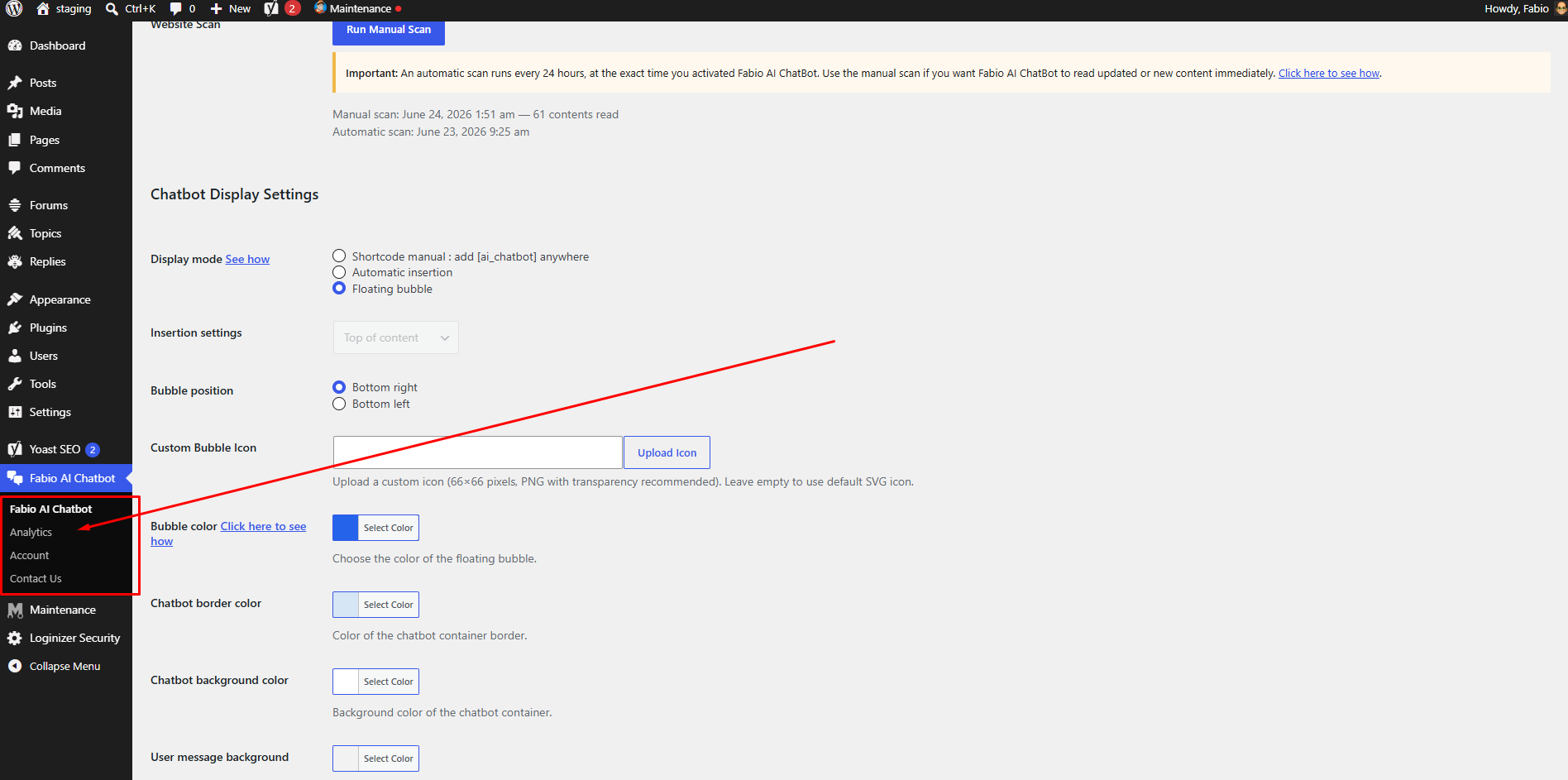
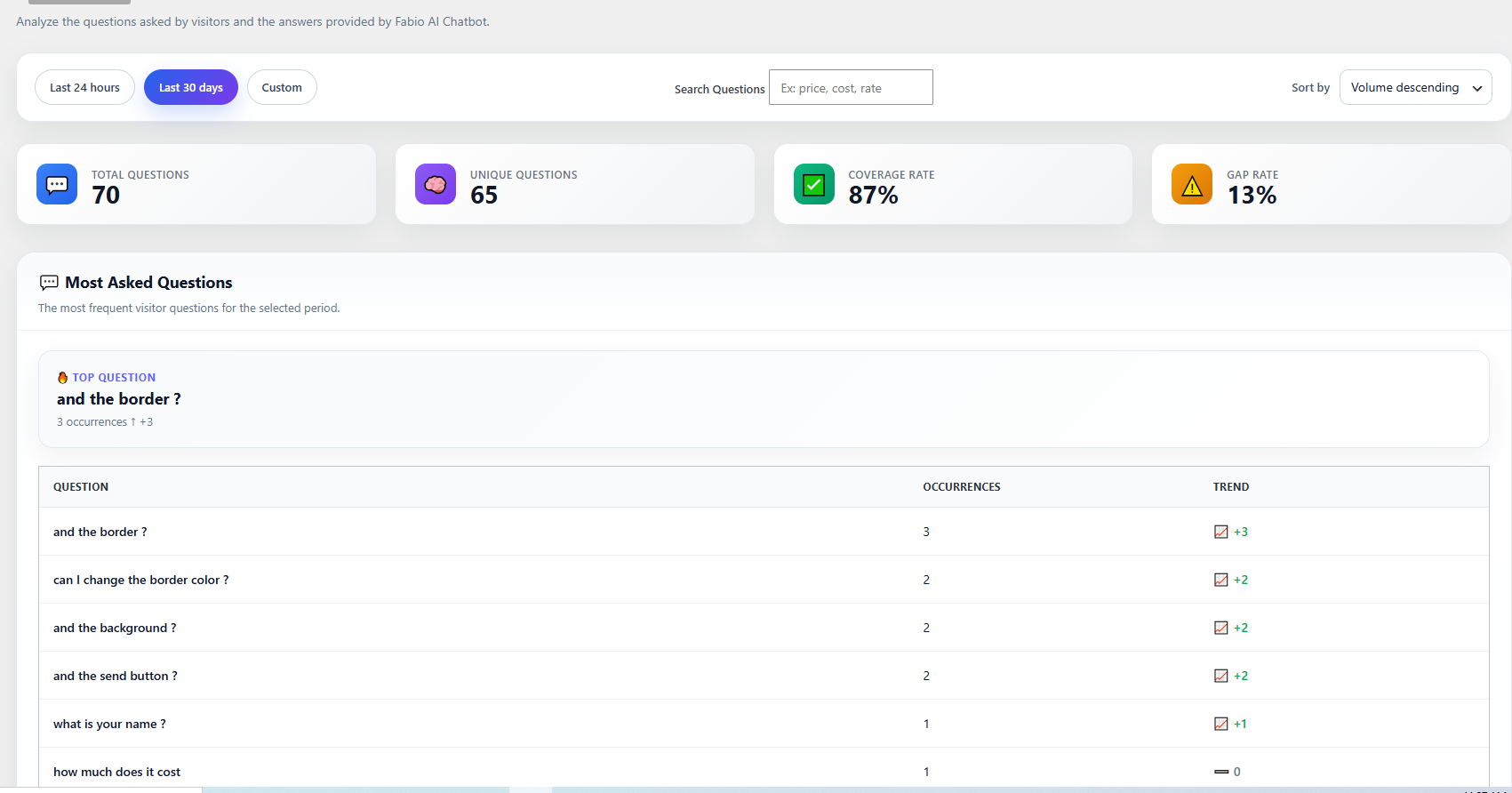
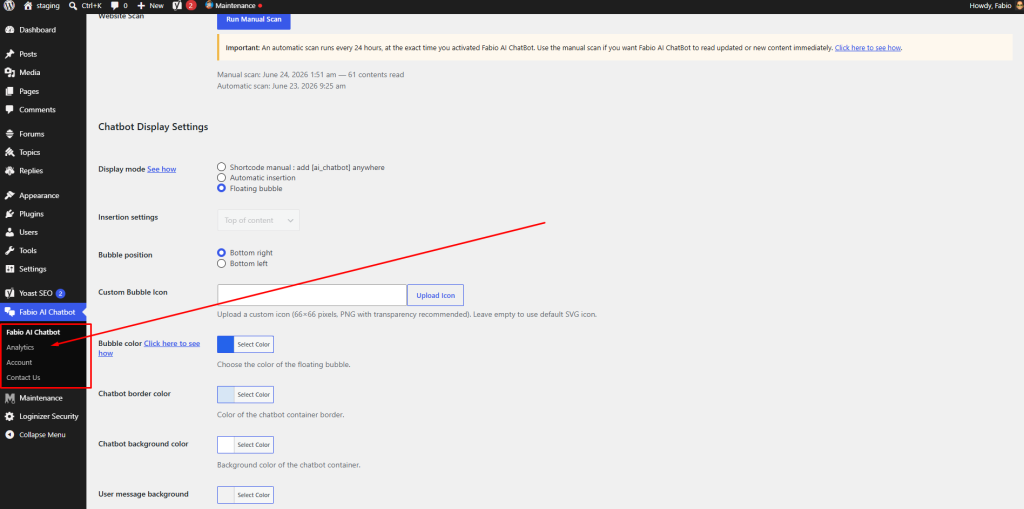
Begin by viewing our how to video here, then go to your WordPress backend, and look for “Fabio AI Chatbot” in the left barre menu. Pass your mouse on “Fabio Ai Chatbot”, you will see a dropdown menu with an option for “Analytics”. Click on “analytics”, it will guide you to the analytic page.
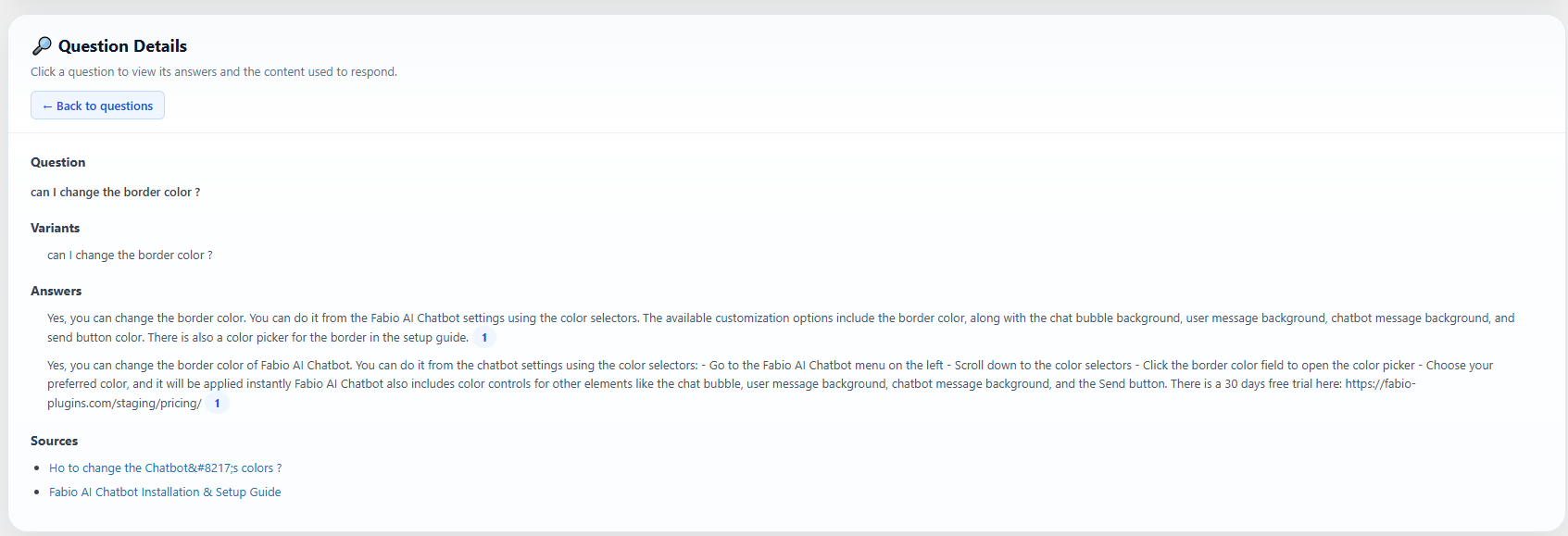
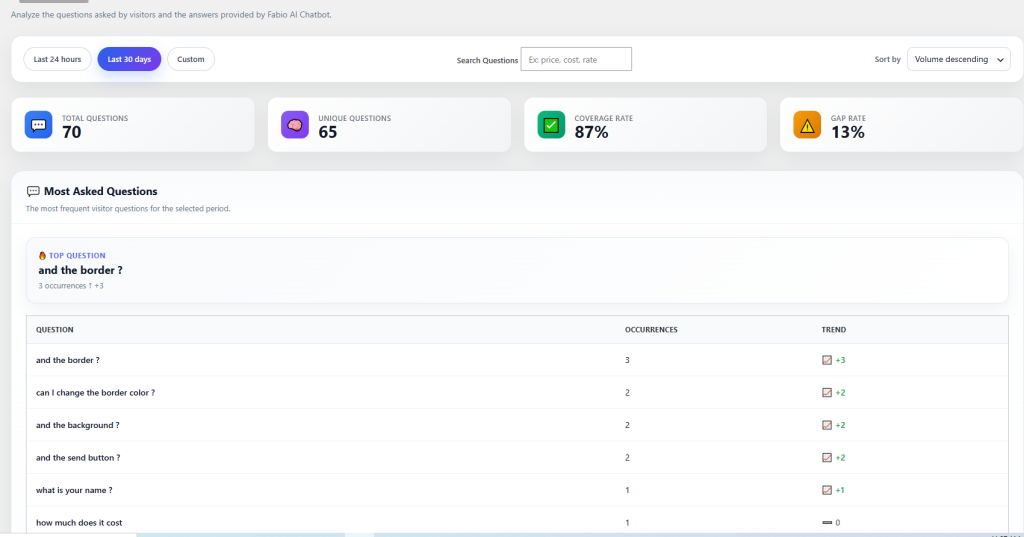
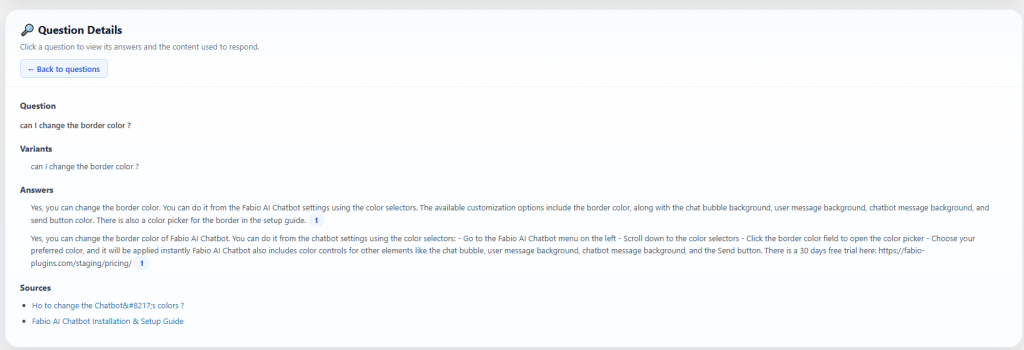
On this analytics page, you can review all questions asked by your visitors, along with the answers and sources provided by Fabio AI Chatbot. You can select questions within a specific date range or filter them by one or more keywords. Click on any question, and the screen will scroll down to the corresponding answer from Fabio AI Chatbot, allowing you to assess whether your content provides the correct information.
With these analytics, you can easily identify if certain information should be more prominent in your content and update the relevant pages accordingly.
2- Analyzing the conversations by downlaoding all on a csv and passing the csv in your own AI
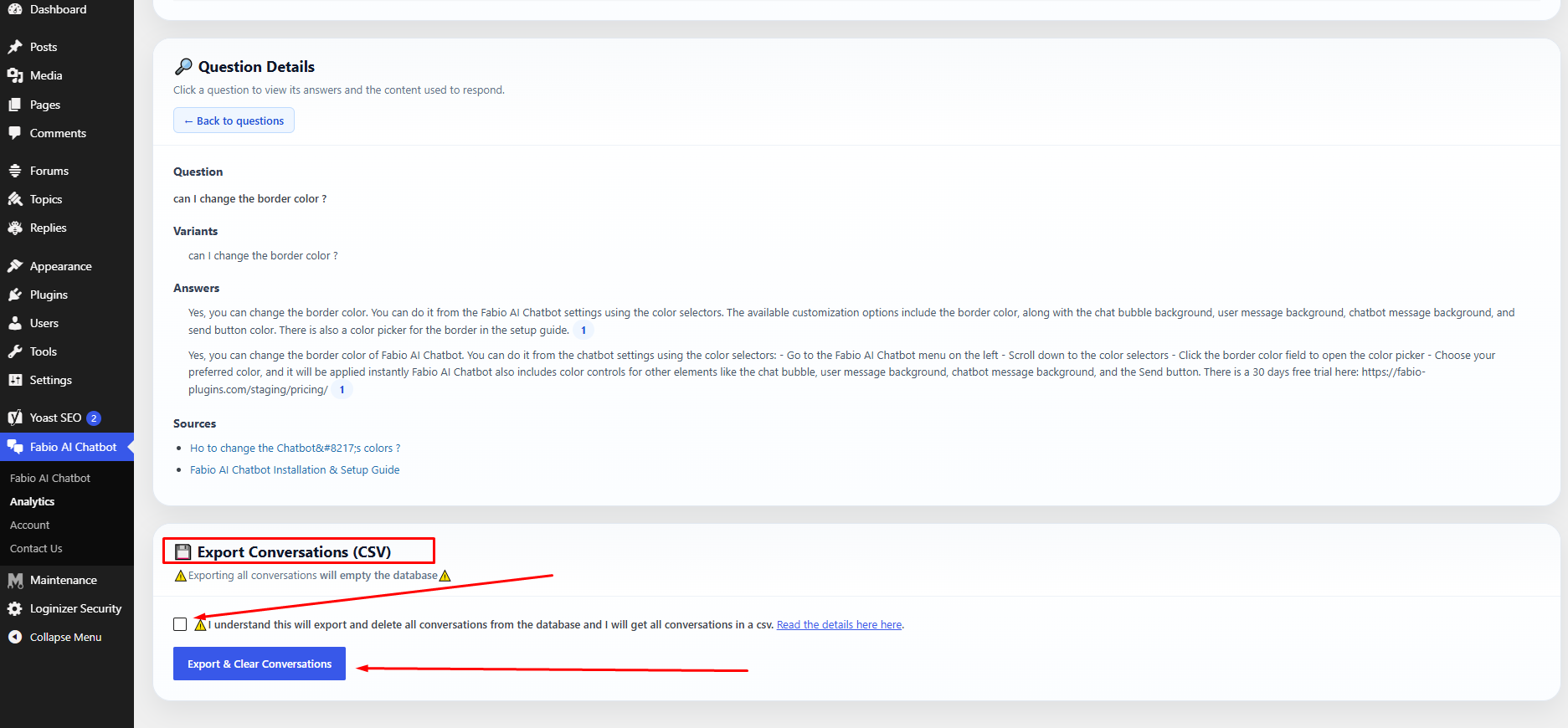
Fabio AI ChatBot allows you to download all conversations from their database, which also empties this database. This allows you to identify the most frequently asked questions, the questions that take the longest to answer, and other useful insights.
1 — Go to the plugin admin.
Click “Download and clear database after export”, then click the button “Download conversations (CSV)”.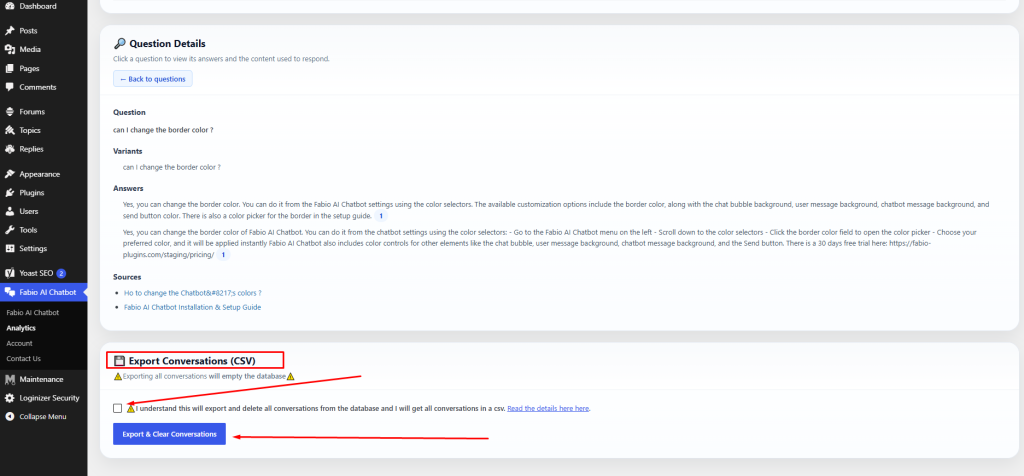
2 — The export will download and clear the conversation database.
After the export, the conversation database is automatically emptied to reduce server resource usage. The CSV file will look like this: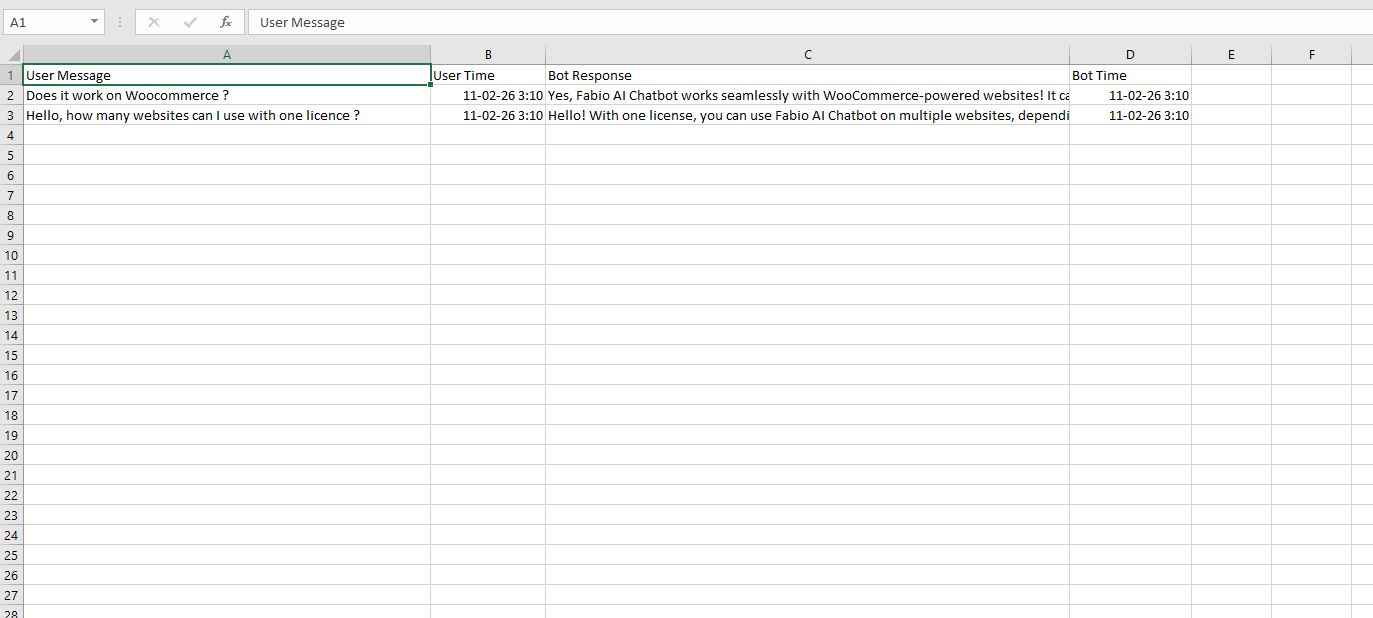
3 — Upload the CSV file to any AI tool and use a prompt like the one below:
I have exported a CSV file containing conversations between visitors and my website chatbot.

The CSV contains user messages and chatbot replies.

Your task is to analyze this file and provide:

- The most frequently asked questions or topics (group similar questions together)
- The questions that take the longest to answer
- The top recurring user intents
- Any repeated problems, confusion, or unmet needs
- Content gaps on my website suggested by these questions
- Suggestions for new pages, FAQs, or improvements based on user demand
- A short executive summary of what visitors are mainly looking for

If possible:
- Categorize questions by theme
- Provide percentages or frequency estimates
- Highlight opportunities to improve conversions

Base your analysis only on the data inside the CSV.
Be structured, clear, and concise.
Why should you analyze these questions?
Because it helps you understand which questions your audience asks most often, and which answers the chatbot cannot find in your content.
If Fabio AI Chatbot cannot find an answer, it usually means the information is not clearly explained on your website.
When your analysis shows responses such as “I can’t find the answer in the content”, you should improve or expand the information related to that question on your site.
-
This reply was modified 7 months, 3 weeks ago by
Fabio.
-
This reply was modified 7 months, 3 weeks ago by
-
This reply was modified 4 months ago by
-
This reply was modified 4 months ago by
-
This reply was modified 4 months ago by
-
This reply was modified 3 months, 3 weeks ago by
KeymasterYes, a debit or credit card is required to start the 14-day free trial. You can start the 14-day free trial with a credit or debit card. You will benefit from 100% of the features available with the paid version during your free trial.
The paid subscription begins after the end of your 14-day trial period. Please note, however, that the Fabio plugin does not save your bank details. Your bank details are processed by Stripe for the account of Freemius click here to know how Freemius protects your bank datas.
KeymasterThe native WordPress search field returns URLs based on the keywords entered by the user.
Fabio AI Chatbot provides an explanation, a short summary, and up to three related URLs that match the user’s question.Visitors can ask natural, human-style questions about a very specific topic and receive an answer within seconds.
In short, Fabio AI Chatbot gives users clearer information than the default WordPress search and helps increase engagement on your website.
February 7, 2026 at 4:30 am in reply to: Does Fabio AI Chatbot use external sources or the internet? #360KeymasterNo, Fabio AI Chatbot does not use its own knowledge base to answer your visitors.
The plugin only uses the content available on your website.
It will only provide information that exists on your site.KeymasterFabio ChatBot Lite is Free and available on WordPress directory.
Fabio Chatbot Biz comes with a 14-day free trial.
During this period, you need to enter a credit card or a debit card but you will be debited only after the end of the trial.
You will receive an email 7 days prior to the end of the trial.
If you wish to continue with Fabio AI Chatbot after the end of the 14 days free trial, you don’t need to do anything : your debit card or credit card will be debited accordingly. Pease note that Fabio Plugins does not store your bank details, the payment is processed by Stripe.KeymasterFabio AI Chatbot is installed on a WordPress site and scans all the content available on that installation, including posts, pages, tags, categories, and products.
It is not possible to limit or exclude specific parts of the site from being scanned.
If you want Fabio AI Chatbot to provide information only about a specific section of your website, WordPress must be installed separately for that section, either using a subdomain or a subdirectory.
If this is unclear, please ask for help here:
KeymasterYes, you need an APi key to use Fabio AI Plugin. The API key is not included in the monthly subscription price, but it’s about 1 USD for 100 questions and answers. This means that when 100 visitors will have asked each one question and gotten each one answer, you will have spent between 0.22 USD and 1 USD for 100 user questions and 100 Chatbot answers.
Check here to know how to get an OpenAI Key, how to get a Gemini Key and how to create a Mistral key.
KeymasterFabio AI Chatbot is installed using the shortcode [[fabioai_chatbot]].
The shortcode can be added manually to your content or inserted automatically, either by a plugin or with custom code.If you’re not sure what this means, please ask for help here:
We’ll help you set it up.
-
This reply was modified 7 months, 3 weeks ago by
-
AuthorPosts