

Forum Replies Created
-
AuthorPosts
-
Fabio
KeymasterYes, you can download the conversations for analysis. This allows you to identify the most frequently asked questions, the questions that take the longest to answer, and other useful insights.
1 — Go to the plugin admin.
Click “Download and clear database after export”, then click the button “Download conversations (CSV)”.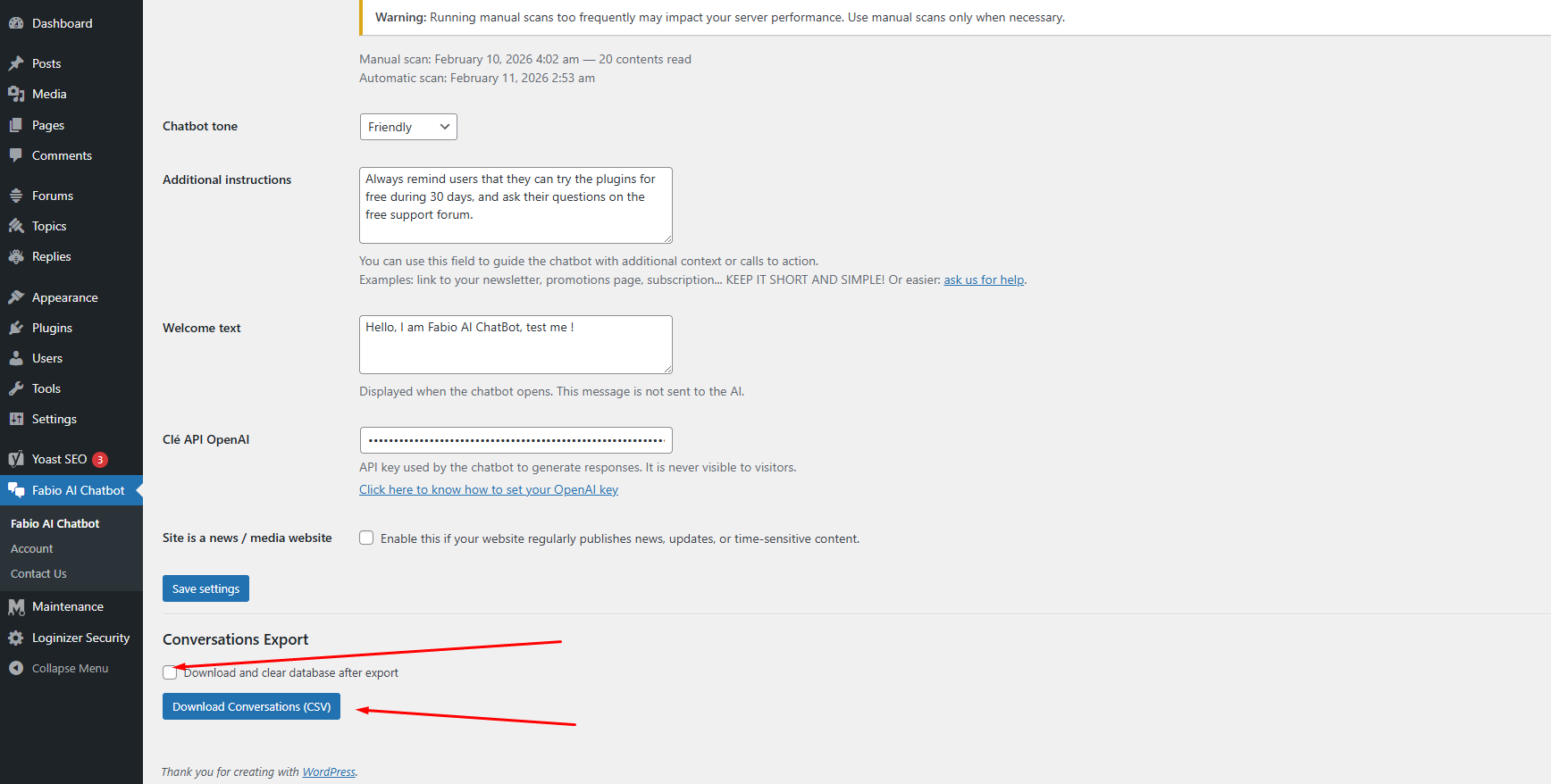
2 — The export will download and clear the conversation database.
After the export, the conversation database is automatically emptied to reduce server resource usage. The CSV file will look like this: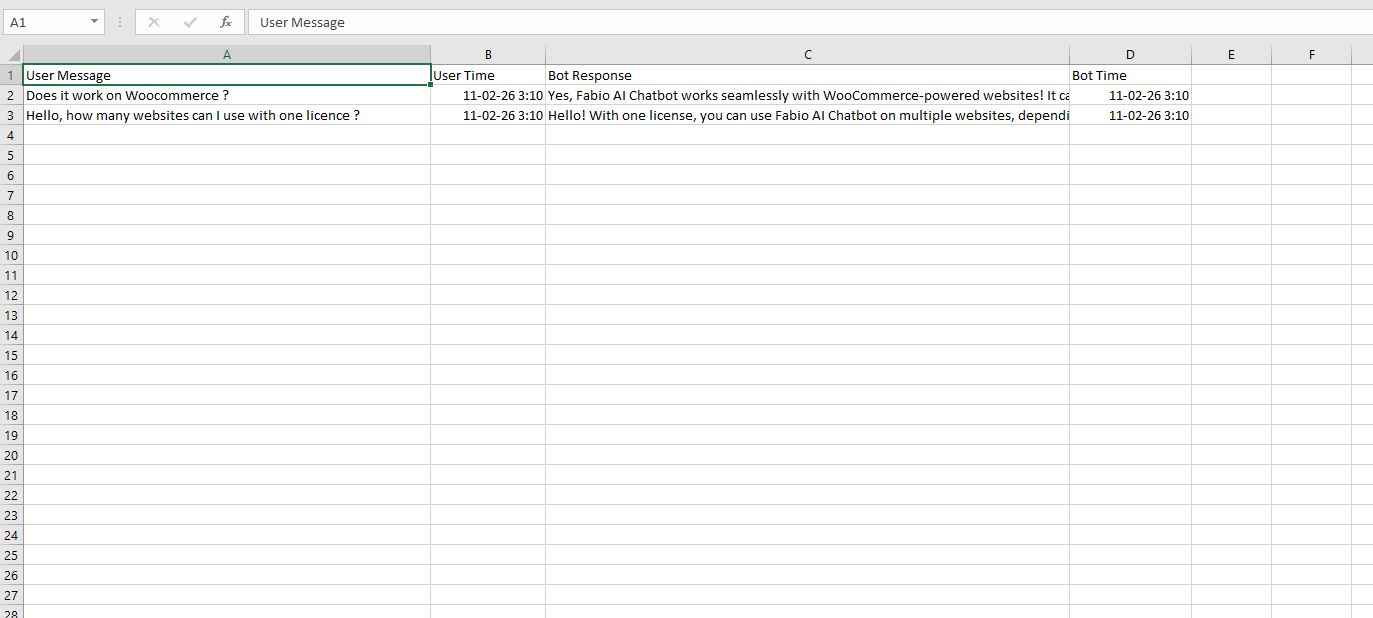
3 — Upload the CSV file to any AI tool and use a prompt like the one below:
I have exported a CSV file containing conversations between visitors and my website chatbot.

The CSV contains user messages and chatbot replies.

Your task is to analyze this file and provide:

- The most frequently asked questions or topics (group similar questions together)
- The questions that take the longest to answer
- The top recurring user intents
- Any repeated problems, confusion, or unmet needs
- Content gaps on my website suggested by these questions
- Suggestions for new pages, FAQs, or improvements based on user demand
- A short executive summary of what visitors are mainly looking for

If possible:
- Categorize questions by theme
- Provide percentages or frequency estimates
- Highlight opportunities to improve conversions

Base your analysis only on the data inside the CSV.
Be structured, clear, and concise.
Why should you analyze these questions?
Because it helps you understand which questions your audience asks most often, and which answers the chatbot cannot find in your content.
If Fabio AI Chatbot cannot find an answer, it usually means the information is not clearly explained on your website.
When your analysis shows responses such as “I can’t find the answer in the content”, you should improve or expand the information related to that question on your site.
KeymasterYes, a debit or credit card is required to start the 30-day free trial.
However, Fabio AI Chatbot does not store your payment details.Payments are handled by Freemius and the Stripe payment platform.
We never have access to your card information.You can cancel your trial at any time during the 30 days with no charge.
Most debit and credit cards from most countries are accepted.KeymasterThe native WordPress search field returns URLs based on the keywords entered by the user.
Fabio AI Chatbot provides an explanation, a short summary, and up to three related URLs that match the user’s question.Visitors can ask natural, human-style questions about a very specific topic and receive an answer within seconds.
In short, Fabio AI Chatbot gives users clearer information than the default WordPress search and helps increase engagement on your website.
February 7, 2026 at 4:30 am in reply to: Does Fabio AI Chatbot use external sources or the internet? #360KeymasterNo, Fabio AI Chatbot does not use its own knowledge base to answer your visitors.
The plugin only uses the content available on your website.
It will only provide information that exists on your site.KeymasterFabio AI Chatbot comes with a 30-day free trial.
During this period, you can cancel at any time and you will not be charged.Your paid subscription will start after the 30-day trial ends.
Your debit or credit card will only be charged once the trial period is over, not before.KeymasterFabio AI Chatbot is installed on a WordPress site and scans all the content available on that installation, including posts, pages, tags, categories, and products.
It is not possible to limit or exclude specific parts of the site from being scanned.
If you want Fabio AI Chatbot to provide information only about a specific section of your website, WordPress must be installed separately for that section, either using a subdomain or a subdirectory.
If this is unclear, please ask for help here:
KeymasterYou do not need to subscribe to a monthly ChatGPT plan.
You only need to purchase API tokens.At the moment, Fabio AI Chatbot works with an OpenAI API key.
Development is in progress to also support Claude AI and Gemini API keys.Fabio AI Chatbot uses ChatGPT 5.0 Mini, as it is the most cost-effective option and works very well for answering visitor questions.
You can create your OpenAI API key here:
https://platform.openai.com/api-keysYou can check ChatGPT API pricing here:
https://platform.openai.com/docs/pricingThe cost is only a few cents for several hundred conversations.
If you need help creating or setting up an API key, please ask for help on this forum:
-
This reply was modified 3 weeks, 1 day ago by
Fabio.
KeymasterFabio AI Chatbot is installed using the shortcode [ai_chatbot].
The shortcode can be added manually to your content or inserted automatically, either by a plugin or with custom code.If you’re not sure what this means, please ask for help here:
We’ll help you set it up.
February 7, 2026 at 4:02 am in reply to: Is it Fabio AI Chatbot compatible with caching plugins? #352KeymasterFabio AI Chatbot gets its information from the database content of posts, tags, pages, and WooCommerce products.
The plugin does not use any cache.Answers are based only on the content available at the time of the last scan.
However, some conflicts can still occur.You may also need to adjust your caching plugin settings to control where Fabio AI Chatbot appears on your site.
If you’re not sure, please ask for help on this forum : https://fabio-plugins.com/support/help/tech/February 7, 2026 at 3:59 am in reply to: Are there any known plugin conflicts with Fabio AI Chatbot ? #351KeymasterThere can always be conflicts between WordPress plugins.
We recommend testing Fabio AI Chatbot on a staging site first, especially if you are using many plugins.If you’re not sure what this means, or if you run into a technical issue with Fabio AI Chatbot, please ask for help on this forum:
-
This reply was modified 3 weeks, 1 day ago by
-
AuthorPosts